It’s part of being a Dedicated Server and Cloud hosting company. We go through a lot of hardware. If a customer cancels service and the server hardware is still viable, it will still be used to provide service to a new customer. The hard disks and SSDs in your old systems contain your data. We want to make sure it has the lowest likelihood of failure possible, and you don’t want that data being exposed to another customer when you are done with the server. So, I figured I’d share a few words about how we handle disks before, during, and after we provide services to our customers, including the hard drive data destruction procedures we follow.
We always stock an appropriate number of spare disks and SSDs to be sure we can replace any failed disks from systems that are already in production. While we try to standardize on particular models and sizes, we have thousands of disks in production and some have been spinning for several years. So, we have many different models and sizes in stock.
When we buy disks, we only buy new disks, and generally all disks we buy for production are “Enterprise” models (topic for another blog post). We do not buy “open box”, relabeled, used, liquidated, refurbished or otherwise imperfect disks. We could save money on the acquisition of disks if we bought desktop or consumer models, or refurbished or “open box” disks, but in our experience, it’s not worth it.
Before putting a new disk into production, it is removed from the manufacturers static bag, and tested. We do a performance test and we check the disk for errors. We compare the performance of the disk being tested with the expected performance of the same model. If it’s not up to snuff, then it is sent back to the manufacturer.
Not every server put in to production is given brand new disks. If a customer only uses a server for a short time and either upgrades or cancels for some reason, the disks may be used for a new deployment. How we prepare a used disk for reuse is vitally important. It is important because there may be data on that disk that is private to the former users of that disks.
When a server is decommissioned, we run through a process of removing the disks and placing them in a physically separated area where they are queued for wiping and testing. All disks must be tested and securely wiped before they are either reused or leave our possession. Secure data destruction is an essential and non-negotiable part of our process.
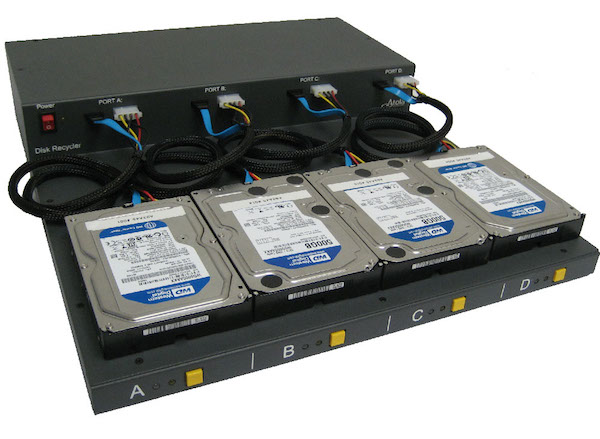
For testing and wiping we use Atola Disk Recyclers like the one depicted below. We test the performance of the disk, and check the S.M.A.R.T. (Self-Monitoring, Analysis, and Reporting Technology) data. If the S.M.A.R.T. data and the performance tests meet our standards (especially “power on hours” and “reallocated sector count”), then the rest of the process continues. The system unclips the HPA/DCO areas, and wipes the entire disk with the “Secure Erase” function, or if that is not supported on the particular drive, then a NIST standard wipe pattern is used (eg: all zeroes). If the number of bad or reallocated sectors is below our maximum (as of this writing the maximum acceptable bad or reallocated sectors for us to deploy a disk is 3 sectors), then those sectors are remapped with a repair process. We then place an unmistakable, bright colored label on the disk that it is ready to be reused. The disk is then placed in bins in our parts inventory area. Any disk we use for a deployment must have this unmistakable label. The label covers the data port of the disk. The disk can not be used unless the label is removed. Any disk that does not have this label covering the data ports is considered “dirty” and can not be used… not until tested, wiped and marked again.
OK, that’s great… but what about disks that fail testing? If a disk is still a usable size and age, but fails performance tests, and it is under warranty, then we will wipe it and return it to the manufacturer. If it is not under warranty, we will physically destroy the hard disk as part of our data destruction policy. We will literally crush it. We used to bring them to a local recycler to be shredded in batches, but we decided to get them done more immediately in-house. We use this:
We can, at your request, ship the decommissioned disks that were in your servers hosted with us, to you. We will charge for shipping costs and a reasonable price for the disk value. Optionally, we can also provide a report showing the serial number and the process run on the Atola disk recycler. We can also provide video/photographic evidence of the destruction of your disks detailing the serial number and it’s obvious unrecoverable physical state. Our procedures go beyond typical hard drive data destruction standards.
Every hosting company and every cloud company has the burden of possessing their customer’s precious data. When you consider a service provider of any kind, please ask them about how they handle your data when you terminate your relationship with them. Ask them about how they protect your data through the hardware lifecycle. You might also ask them what tests they run to ensure the disks they will use in your server have the best possibility of running without error for as long as you want them to.
Frequently Asked Questions
How do data centers prevent data exposure when servers are reused?
At M5 Hosting, hard drives are never reused without going through a strict testing and wiping process. When a server is decommissioned, the drives are removed and placed in a secure area for testing. Using tools such as the Atola Disk Recycler, each disk is checked for performance and S.M.A.R.T. data, then securely wiped using Secure Erase or a NIST-standard wipe pattern. Only drives that pass testing are labeled for reuse, while any disk that fails testing is either returned under warranty or physically destroyed to ensure customer data cannot be recovered.
What happens to hard drives when a dedicated server is decommissioned?
When a dedicated server is decommissioned at M5 Hosting, the drives are removed and placed in a separate area for testing and secure wiping. Each disk is inspected for performance and health before the data is erased. Drives that pass testing are clearly labeled and returned to inventory for future deployments, while drives that fail testing are returned under warranty or physically destroyed.
What is secure erase, and why is it important for hard drives?
Many SSDs and hard drives support secure erase, a built-in function that completely removes stored data by resetting all storage blocks on the device. At M5 Hosting, secure erase is used during the disk recycling process to ensure that previous customer data is securely removed before a drive is reused in another server deployment.
How does disk wiping protect customer data in hosting environments?
Disk wiping protects customer data by ensuring that all information stored on a drive is permanently erased before the hardware is reused. At M5 Hosting, every drive from a decommissioned server is tested and securely wiped before it can return to inventory. If a disk cannot meet performance or reliability standards, it is physically destroyed.